Base64 Component
Overview
Base64 is the format commonly used to encode email attachments. Base64 is also the preferred method for encoding binary data in XML documents. The encoding takes 3 bytes of data and converts it into 4 bytes of plain text using characters 0 to 9 and A to F. Base64 is not encryption, it is used to package data for storage or transmission. This component can be used in environments that support COM such as Active Server Pages, Windows Scripting Host, Visual Basic, etc.
- License
- Freeware
- Type
- 32-bit ActiveX DLL
- Version
- 1.5
- File Name
- XBase64.dll
- Download Package
- x-base64.zip
Download
Download Base64 component
Installation Instructions
- Move the dll to a directory like: C:\Program Files\XStandard\Bin\.
- Open a command prompt and
cd to the directory where the dll is located. - Type regsvr32 XBase64.dll or on 64-bit OS type C:\Windows\SysWOW64\regsvr32.exe XBase64.dll
- Grant "Read & Execute" file permissions on this dll to Everyone.
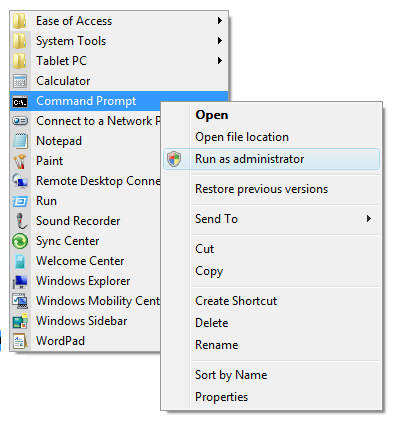
Note, the command prompt must be "Run as administrator" as shown in the screen shot below.
Uninstall Instructions
- Open a command prompt and
cd to the directory where the dll is located. - Type regsvr32 -u XBase64.dll or on 64-bit OS type C:\Windows\SysWOW64\regsvr32.exe -u XBase64.dll
Usage from 64-bit OS
Please see instructions for 64-bit OS usage.
API Reference: ProgID: XStandard.Base64
Function Decode(Source, [OutType As OutputTypes = otSafeArray])
Decode Base64 encoded variant string or SafeArray
Function Encode(Source, [OutType As OutputTypes = otSafeArray])
Base64 encode a variant string or SafeArray
Property LogFile As String
Path to log file
Property Version As String
(read-only)
Product version
API Reference: Enum: OutputTypes
Const otSafeArray = 0
SafeArray data type
Const otString = 2
String data type
Examples
The examples below are for Active Server Pages. For Windows Scripting Host or Visual Basic, replace Server.CreateObject with CreateObject and replace Resonse.Write with MsgBox.
How to encode text
<%Dim objBase64Const otSafeArray = 0Const otString = 2Set objBase64 = Server.CreateObject("XStandard.Base64")Response.Write objBase64.Encode("Hello World!", otString)Set objBase64 = Nothing%>
How to decode text
<%Dim objBase64Const otSafeArray = 0Const otString = 2Set objBase64 = Server.CreateObject("XStandard.Base64")Response.Write objBase64.Decode("SGVsbG8gV29ybGQh", otString)Set objBase64 = Nothing%>
How to store an image inline with the code
<%Dim objBase64, strImageConst otSafeArray = 0Const otString = 2strImage = "R0lGODlhEgASAKIAAMDAwICAgP8AAAAAAP///w" & _
"AAAAAAAAAAACH5BAAAAAAALAAAAAASABIAAAM8" & vbCrLf & _
"SLrc/rCJSWdU1b4xAqZKwDWcR2iiSXZMGpUKfJ" & _
"XyRYisTQDcaPOD2AAQwTE4RIdxlVwsHUinD1LT" & vbCrLf & _
"WSMJADs="Set objBase64 = Server.CreateObject("XStandard.Base64")Response.ContentType = "image/gif"Response.AddHeader "content-disposition", "inline; filename=xstandard.gif"Response.BinaryWrite objBase64.Decode(strImage, otSafeArray)Set objBase64 = Nothing%>