Did You Know?
FAQs
Did you know that if you can create line breaks with a keyboard shortcut?
Press Shift-Enter, you get a <br />.
Did you know that you can put a cursor in front of and behind block elements?
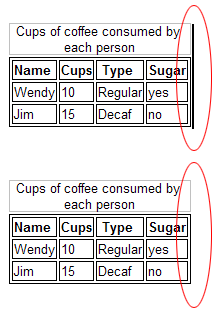
Block elements are <div>, <table>, <ol>, <ul>, <blockquote> and <hr>. See this by pressing the left or right arrow keys until the cursor displays alongside content, as shown in the screenshot below. This is very useful when you have 2 <div> or <table> structures next to each other and you need to add text or objects between them.
<p>Today's temperature is <temperature title="Placeholder for temperature."/>.</p>
... and when you display the content on a Web page, the custom tag (placeholder) is replaced by dynamic data. The markup above gives the following result when the placeholder is for the current temperature:
Today's temperature is 23°C.
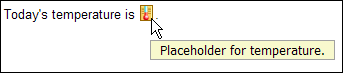
As seen in the screenshot below, you can make custom tags easier to recognize and apply by assigning them custom icons and tooltips, using the placeholders.xml file. The text used in the title attribute for the custom tag displays as a tooltip..
Did you know that the output code from XStandard is an XML fragment?
This means that you can load it into DOM XML parser or process it with XSLT.
Since XStandard is a content editor, the markup it generates is an XML fragment without a root element. So, before you load this markup into an XML parser, you need to add the root element yourself. Here is a Visual Basic 6 example:
Dim objDoc As MSXML2.DOMDocument40Set objDoc = New MSXML2.DOMDocument40objDoc.async = FalseobjDoc.loadXML "<root>" & XHTMLEditor1.Value & "</root>"MsgBox objDoc.xmlSet objDoc = Nothing
Here is the same example in C#:
XmlDocument doc = new XmlDocument();XmlNamespaceManager namespaceManager = new XmlNamespaceManager(doc.NameTable);doc.LoadXml("<root>" + axXHTMLEditor1.Value + "</root>");MessageBox.Show(doc.InnerXml.ToString());
Did you know that you can omit mailto: when creating a hyperlink to an email address?
XStandard automatically inserts mailto: for you.
Insert a ; between button IDs in the Toolbar param tag. For example:
<param name="ToolbarWysiwyg" value="ordered-list,unordered-list;image,hyperlink" />
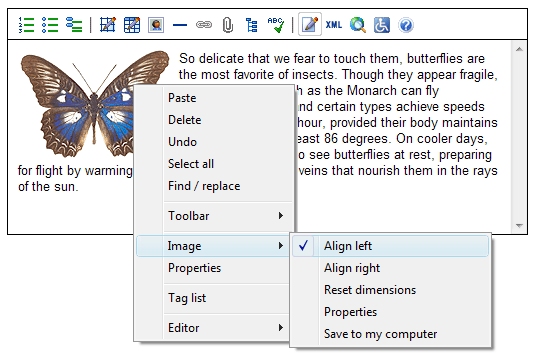
Did you know that you can add image alignment options to the image context pop-up menu?
Create CSS classes for image alignment like this:
img.left {float:left}img.right {float:right}
Then let the editor know about these CSS classes like this:
<param name="ClassImageFloatLeft" value="left" /><param name="ClassImageFloatRight" value="right" />
The screenshot belows shows the result: