XStandard XHTML (Strict or 1.1) WYSIWYG Editor

XStandard - Do it right. The rest will follow.

Foreign Characters

Insert foreign characters or symbols

Insert foreign characters or symbols

  • The Directory service is used to insert foreign characters or symbols into the editor at the cursor point.
  • The selection of foreign characters and symbols available to you is determined by your System Administrator.
  1. In Edit mode, place the cursor at the point you want to insert a foreign character or a symbol.
  2. On the toolbar, select the Directory button . Or, in the context menu, select Toolbar, Buttons, Directory.
  3. In the Directory dialog box seen below, browse available sources and select the character or symbol you wish to appear at the cursor point.
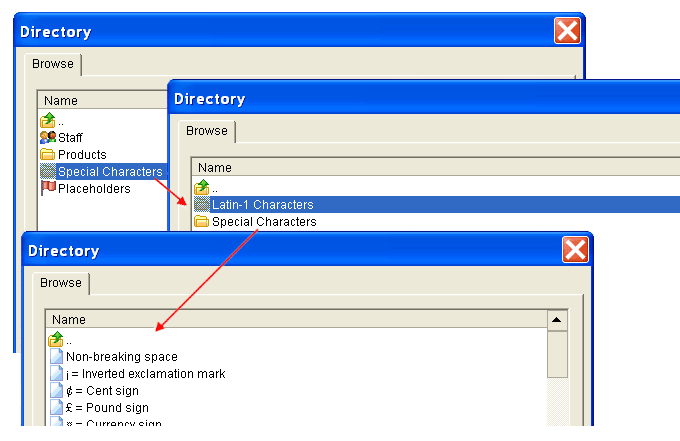
Insert foreign characters into the editor.

Navigation

XStandard works for ...

AT&T, IBM, Microsoft, Xerox, Siemens, Philips, American Express, BP, HarperCollins Publishers, Penton, Colgate

What's New In XStandard Version 2.0

  • Support for OS X
  • Keyboard accessible interface
  • Find / replace
  • Support for JavaScript events
  • Enhancements to image and attachment libraries
  • Enhancements to table creation
  • Support for authoring definition lists
  • Ability to save images from the editor to My Computer

Full details on all new features

Most Popular FREE Downloads

  1. XStandard WYSIWYG Editor
  2. HTTP component
  3. ZIP component
  4. Image size component
  5. Base64 component