XStandard XHTML (Strict or 1.1) WYSIWYG Editor

XStandard - Do it right. The rest will follow.

title

Definition

The <title> element is used to identify the document.

Example

  1. <head>
  2. <title>XHTML Reference</title>
  3. </head>

Many Web browsers display the title in the title bar. For example:
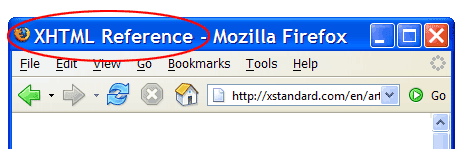
Screen shot of a Web browser with the title 'XHTML Reference'.

Best practice

Each Web page should have a unique title. This helps identify the contents of the page for users of assistive technologies. Also, many search engines favor Web sites that have uniquely named Web pages.

Attributes

Common internationalization attributes

xml:lang
(NameToken) This attribute specifies the base language of an element's attribute values and text content.
dir

This attribute specifies the base direction of text. Possible values:

  • ltr: Left-to-right
  • rtl: Right-to-left

Contains

  • Text

Navigation

XStandard works for ...

AT&T, IBM, Microsoft, Xerox, Siemens, Philips, American Express, BP, HarperCollins Publishers, Penton, Colgate, FAA, NetIQ, Duke University Health System

What's New In XStandard Version 2.0

  • Support for OS X
  • Keyboard accessible interface
  • Find / replace
  • Support for JavaScript events
  • Enhancements to image and attachment libraries
  • Enhancements to table creation
  • Support for authoring definition lists
  • Ability to save images from the editor to My Computer

Full details on all new features

Most Popular FREE Downloads

  1. XStandard WYSIWYG Editor
  2. HTTP component
  3. ZIP component
  4. Image size component
  5. Base64 component